MCP server Mermaid live reload
Ask Claude for a diagram. Watch it render as you refine it.
claude-mermaid renders Mermaid diagrams in your browser and reloads them over a WebSocket every time Claude edits the code. Flowcharts, sequence diagrams, ER diagrams — previewed live, exported to SVG, PNG, or PDF.
$ /plugin marketplace add veelenga/claude-mermaid
$ /plugin install claude-mermaid@claude-mermaid
Free and open source · MIT license · works with any MCP client.
graph LR
    A([User login]) --> B{Valid credentials?}
    B -->|Yes| C[Access granted]
    B -->|No| D[Access denied]
    C --> E[Dashboard]
    D --> F[Try again]
    classDef ok stroke:#28c840;
    class C,E ok;
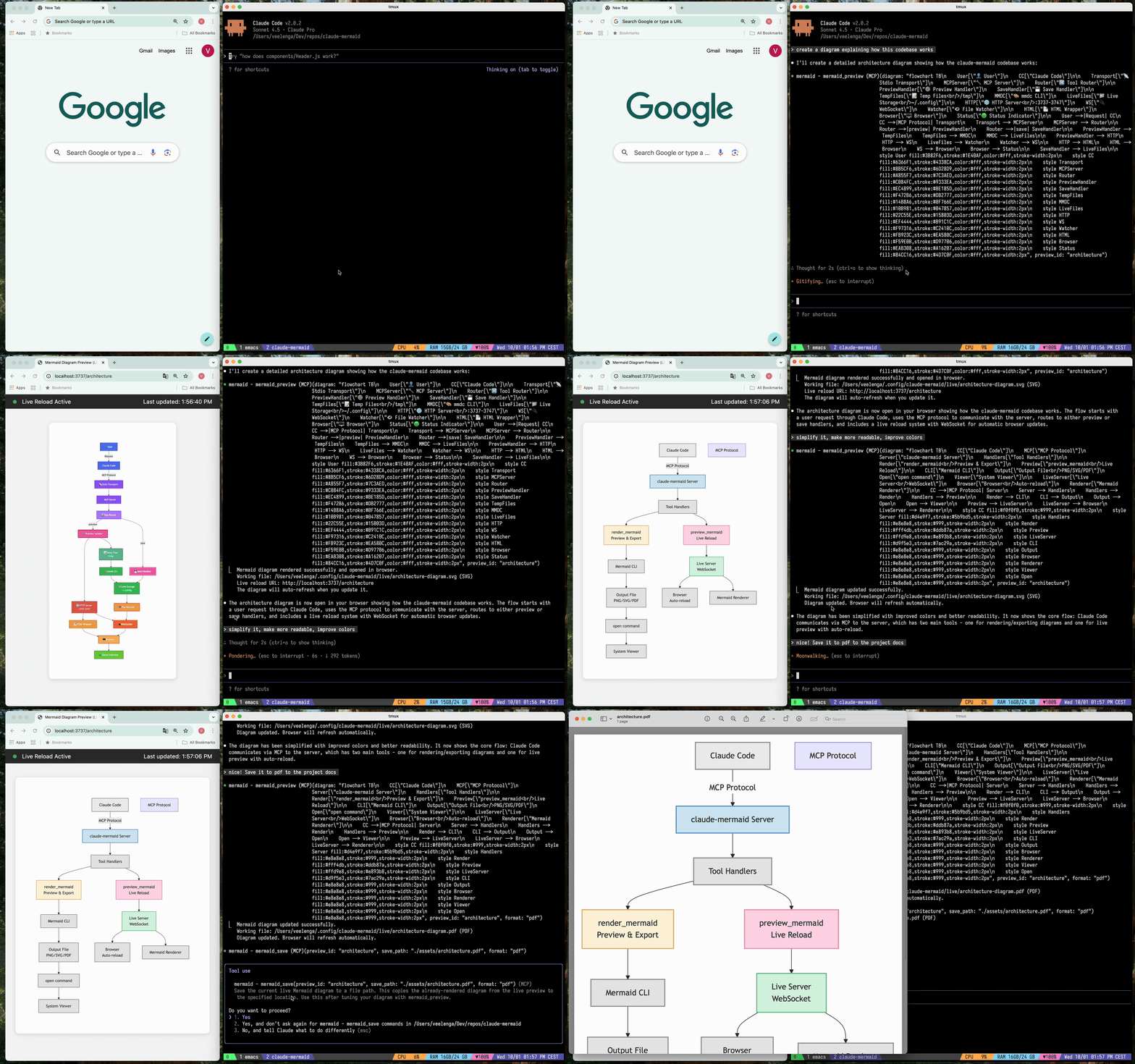
The loop
Edit the code, the browser catches up on its own
No screenshots, no copy-paste, no export-and-refresh. The preview reloads the instant Claude changes the diagram.
How it works
A local render loop, four moving parts
The server is small and predictable. Here is exactly what happens between your request and the diagram on screen.
-
Claude calls a tool
When you ask for a diagram, Claude calls
mermaid_previewwith the Mermaid code and apreview_idthat names the session. -
It renders with mermaid-cli
The server writes the code to a working file and runs
@mermaid-js/mermaid-clito produce an SVG in your chosen theme, background, and scale. -
It serves the diagram locally
A small local server hosts the result at
http://localhost:3737/{preview_id}and opens it in your browser the first time. -
It reloads live over WebSocket
Every later edit re-renders the file and pushes a reload down a WebSocket. A green dot means the tab is connected; red means it is reconnecting.
> Draw a sequence diagram for the OAuth login flow
● I'll render that and open a live preview.
mermaid ▸ mermaid_preview (preview_id: "oauth")
⎿ Rendered successfully · opened http://localhost:3737/oauth
Live reload URL is on — the diagram auto-refreshes when you update it.
Features
Built for iterating on diagrams, not admiring them once
Live reload
The browser refreshes automatically as Claude edits the diagram, with a status dot showing the WebSocket connection.
SVG, PNG, and PDF export
Preview in SVG and save to any of three formats. PNG and PDF render on demand when you save them.
Four themes
Render in default, forest, dark, or
neutral, with control over background, dimensions, and scale.
Pan, zoom, and export in-preview
Drag to pan, use browser zoom, recenter with one click, and download the diagram as SVG or PNG straight from the preview.
Multiple concurrent previews
Give each diagram its own preview_id and work on an architecture map
and a sequence flow side by side.
Persistent working files
Live previews are kept under ~/.config/claude-mermaid/live, so your
diagrams survive between sessions.
Standalone gallery
Run claude-mermaid --serve to open a browser gallery of every diagram
you have rendered — no agent required.
Built-in diagram skill
The Claude Code plugin ships a skill with Mermaid best practices and workflow guidance, so diagrams come out well-formed.
Installation
Pick your client and paste two commands
It is built for Claude Code, where the plugin also installs the diagram skill. Any
MCP-compatible client works with the same claude-mermaid command.
Recommended Add the marketplace and install the plugin from inside Claude Code, then restart to activate it.
$ /plugin marketplace add veelenga/claude-mermaid
$ /plugin install claude-mermaid@claude-mermaid
Restart Claude Code, then run /mcp — you should see
mermaid in the server list.
Install the CLI globally from npm and register it as a user-scoped MCP server.
$ npm install -g claude-mermaid
$ claude mcp add --scope user mermaid claude-mermaid
Verify with claude mcp list — you should see
mermaid: claude-mermaid - ✓ Connected.
For Cursor, Codex, Windsurf, Cline, Gemini CLI, or any other MCP client, install the package and add this to the client's MCP configuration.
{
  "mcpServers": {
    "mermaid": {
      "command": "claude-mermaid"
    }
  }
}
Some clients want an absolute path — find it with
which claude-mermaid and use that as the command.
Tools reference
Two tools, no ceremony
The server exposes exactly two tools. Claude calls them for you, but here is the full surface.
| Parameter | Type | Default | Description |
|---|---|---|---|
diagram required |
string | — | The Mermaid diagram code to render. |
preview_id required |
string | — | Names the preview session. Use different IDs for concurrent diagrams. |
format |
string | svg |
One of svg, png, pdf. Live preview is
SVG-only.
|
theme |
string | default |
One of default, forest, dark,
neutral.
|
background |
string | white |
Background color, e.g. transparent, white,
#F0F0F0.
|
width |
number | 800 |
Diagram width in pixels. |
height |
number | 600 |
Diagram height in pixels. |
scale |
number | 2 |
Scale factor for higher-quality output. |
| Parameter | Type | Default | Description |
|---|---|---|---|
save_path required |
string | — | Destination path, e.g. ./docs/diagram.svg. |
preview_id required |
string | — |
Must match the preview_id used in mermaid_preview.
|
format |
string | svg |
One of svg, png, pdf. Rendered on demand
if the working file does not exist yet.
|
FAQ
Questions worth answering
Which clients are supported?
It is built for Claude Code, where the plugin also installs a diagram skill. Because it speaks the Model Context Protocol, it works with any MCP client — Cursor, Codex, Windsurf, Cline, and Gemini CLI included — using the standard command configuration.
Does live reload work for PNG and PDF?
Live preview in the browser is SVG-only. PNG and PDF still render and can be saved or exported, but they do not auto-reload. The browser always previews SVG while saving to the format you ask for.
Where are my diagrams stored?
Live working files are kept under ~/.config/claude-mermaid/live so
previews persist between sessions, and logs live under
~/.config/claude-mermaid/logs. The mermaid_save tool
copies the rendered diagram to any path you choose, such as
./docs/diagram.svg.
What ports does it use?
The local preview server uses ports 3737–3747 and
automatically picks the first one that is free.
Can I preview several diagrams at once?
Yes. Give each diagram its own preview_id, such as
architecture or flow, and each gets its own live URL that
reloads independently.
Is it free?
Yes. claude-mermaid is open source under the MIT license.