Slack meets Bedrock: building the gateway
This is part 1 of a three-part series on building a Slack bot powered by AWS Bedrock Agents.
- Building the gateway (this post)
- Knowledge bases, tools, and action groups
- Analytics, monitoring, and production
AWS Bedrock Agents can reason, use tools, search knowledge bases, and execute code. But they have no idea how to talk to Slack. Slack needs WebSocket connections, thread awareness, emoji reactions, and Block Kit formatting. Bedrock speaks HTTP with SigV4 signatures.
These two systems don’t share a single wire protocol. You need a gateway between them.
Everything described in this series is implemented in ark, an open-source Slack gateway for AWS Bedrock Agents written in Crystal. It compiles to a single ~5MB binary, uses under 10MB of RAM at runtime, and handles Socket Mode, session management, concurrency, markdown-to-mrkdwn conversion, and file handling out of the box. If you want a working implementation rather than building from scratch, ark is a good starting point.
Architecture

The gateway sits between Slack and Bedrock. It connects to Slack via Socket Mode (a persistent WebSocket), receives events, calls the Bedrock Agent API over signed HTTP, and posts formatted responses back.
Three responsibilities:
- Protocol translation. Convert Slack events into Bedrock Agent invocations. Convert Bedrock responses into Slack messages.
- Session management. Map Slack threads to Bedrock sessions so conversation context persists.
- Concurrency control. Prevent one slow Bedrock call from blocking everything else.
Why Socket Mode
Slack offers two ways to receive events: webhook URLs and Socket Mode. Webhooks require a public HTTPS endpoint, TLS certificates, and inbound firewall rules. Socket Mode uses an outbound WebSocket connection that Slack initiates from your side.
Socket Mode wins for this use case:
| Webhooks | Socket Mode | |
|---|---|---|
| Public endpoint | Required | Not required |
| TLS certificate | Required | Handled by Slack |
| NAT/firewall friendly | No | Yes |
| Load balancer | Needed at scale | Not needed |
| Deployment complexity | Higher | Lower |
For a bot running as a single ECS task or on a Raspberry Pi, Socket Mode eliminates an entire layer of infrastructure. No ALB, no public subnet, no certificate rotation.
The connection flow:
- Call
apps.connections.openwith your app-level token (xapp-...) - Slack returns a WebSocket URL
- Connect and start receiving events
- Respond with acknowledgments within 3 seconds
- Reconnect on disconnect (Slack sends a
disconnectevent before dropping)
Handling events
The gateway listens for two event types:
Direct messages. When a user sends a DM to the bot, the gateway receives a message event with channel_type: "im". The bot processes the message and replies in the same conversation.
Channel mentions. When someone @mentions the bot in a channel, the gateway receives an app_mention event. The bot strips the mention prefix and processes the remaining text.
Both paths converge into the same handler: extract the user ID, channel, thread timestamp, and message text, then invoke the Bedrock Agent.
A few edge cases to handle:
| Event field | Why it matters |
|---|---|
subtype |
Filter out bot_message, message_changed, etc. Only process null subtype and file_share |
user |
Ignore events from the bot itself to prevent loops |
thread_ts |
If absent, use ts as the thread root. This becomes the session ID |
files |
Attached files need downloading and forwarding to Bedrock |
Session management
Bedrock Agents maintain conversation history per session. The natural mapping: one Slack thread = one Bedrock session. The thread timestamp (thread_ts) serves as the session ID.
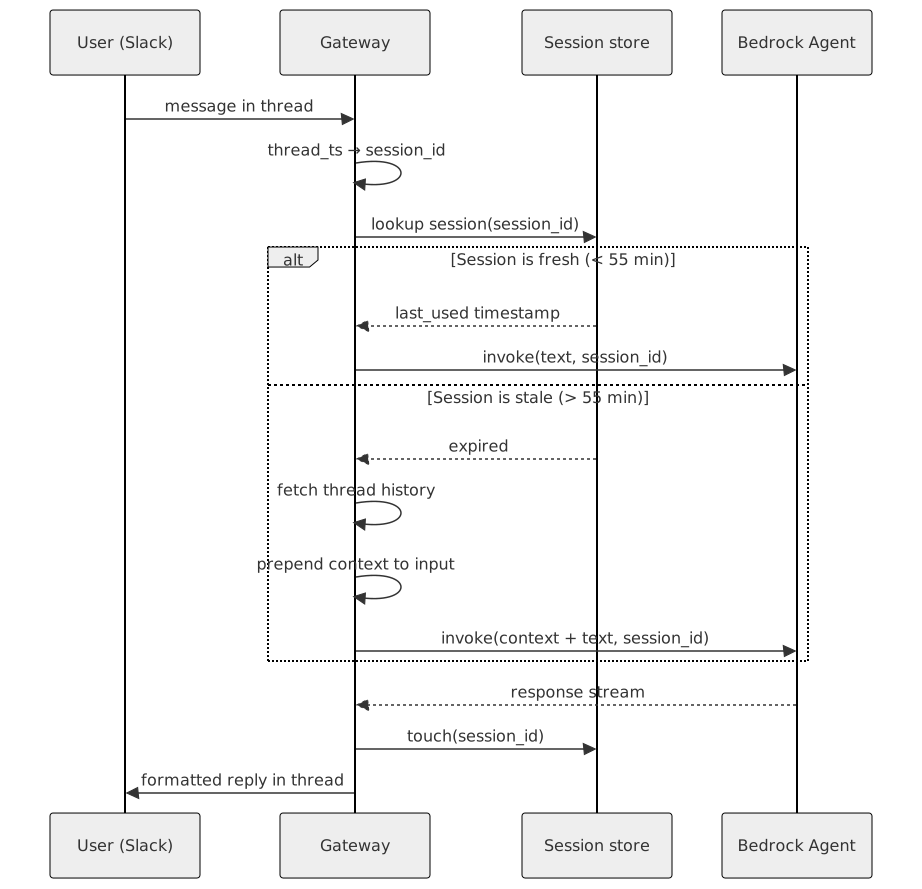
There is a catch. Bedrock Agent sessions expire. The default TTL varies, and your gateway might restart, losing the session on the Bedrock side. When a user continues a thread after the session has gone stale, Bedrock starts fresh with no context.
The fix: detect stale sessions and re-inject context.
session_ttl = 55.minutes

if session_stale?(session_id)
  thread_history = slack.get_thread_replies(channel, thread_ts)
  context = format_as_context(thread_history)
  input = context + "\n\n" + user_message
else
  input = user_message
end

bedrock.invoke(input, session_id)
The gateway keeps an in-memory map of session_id => last_used_at. If the gap exceeds 55 minutes, it fetches the thread history from Slack, formats it as a conversation summary, and prepends it to the new message. The agent picks up where it left off.
Two maintenance tasks keep the session map healthy:
- Touch on use. Update the timestamp after every successful invocation.
- Evict periodically. When the map grows past a threshold (say 1000 entries), remove sessions older than
2 * TTL.
Concurrency
Bedrock Agent calls are slow. A simple query might take 3 seconds. A complex one with knowledge base retrieval and tool execution can take 30 seconds. During that time, other users are sending messages.
A naive approach processes messages sequentially. User B waits for user A’s 30-second call to finish. Unacceptable.
The solution: a bounded semaphore. Set a concurrency limit (10 works well) and process messages in parallel up to that limit. When all slots are full, respond immediately with a “busy” message instead of queuing indefinitely.
semaphore = Channel.new(MAX_CONCURRENT)  # buffered channel
MAX_CONCURRENT.times { semaphore.send(token) }

# For each incoming message:
select
when semaphore.receive  # got a slot
  process(message)
  semaphore.send(token)  # release
else  # all slots busy
  reply("I'm handling several requests right now. Try again in a moment.")
end
This prevents resource exhaustion and gives users immediate feedback instead of mysterious silence.
Formatting
Bedrock Agents return markdown. Slack uses its own format called mrkdwn. They look similar but differ in important ways:
| Element | Markdown | Slack mrkdwn |
|---|---|---|
| Bold | **text** |
*text* |
| Italic | *text* |
_text_ |
| Strikethrough | ~~text~~ |
~text~ |
| Code block | lang `` | `` (no language hint) |
|
| Links | [text](url) |
<url\|text> |
| Headings | ## heading |
*heading* (no native headings) |
Your gateway needs a converter. Walk the markdown, transform each element. Headers become bold text with a newline. Nested lists need manual indentation. Links get angle-bracket syntax.
Tables are the hardest part. Slack’s mrkdwn has no table support. Two options:
- Block Kit rich_text blocks. Use Slack’s
rich_text_listwith structured elements. Looks good but complex to build and has payload size limits. - Code block fallback. Wrap the table in a monospace code block. Less pretty but always works.
The practical approach: try Block Kit first, fall back to code blocks if the payload is too large or the API rejects it.
File handling
Bedrock Agents with the Code Interpreter action group can receive files and produce files. Users attach spreadsheets, the agent analyzes them, and returns a chart. The gateway handles both directions.
Inbound (Slack to Bedrock):
- Extract the
url_private_downloadfrom the file attachment - Download using the bot token as a Bearer header
- Validate size (reject files over a reasonable limit, say 10MB)
- Validate MIME type (Bedrock accepts specific formats: CSV, PDF, images, etc.)
- Base64-encode and include in the Bedrock request body
Outbound (Bedrock to Slack):
- Parse file events from the Bedrock response stream
- Base64-decode the file data
- Upload to Slack using
files.uploadV2in the same thread
Security note: always validate that file download URLs point to *.slack.com over HTTPS before fetching. Bedrock returns file data inline in the response, so there is no URL validation needed on the outbound side.
CloudFormation skeleton
The infrastructure is minimal. An ECS task running the ark container, with secrets injected at startup. Ark publishes Docker images to GitHub Container Registry, so you can use them directly:
TaskDefinition:
  Type: AWS::ECS::TaskDefinition
  Properties:
    Memory: 128
    Cpu: 128
    ContainerDefinitions:
      - Name: slack-gateway
        Image: ghcr.io/crystal-autobot/ark:latest
        Environment:
          - Name: BEDROCK_AGENT_ID
            Value: !Ref BedrockAgent
          - Name: BEDROCK_AGENT_ALIAS_ID
            Value: !GetAtt BedrockAgentAlias.AgentAliasId
        Secrets:
          - Name: SLACK_BOT_TOKEN
            ValueFrom: !Ref SlackBotTokenSecret
          - Name: SLACK_APP_TOKEN
            ValueFrom: !Ref SlackAppTokenSecret
The ECS task role needs exactly two permissions:
- Effect: Allow
  Action: bedrock:InvokeAgent
  Resource:
    - !Sub 'arn:aws:bedrock:${AWS::Region}:${AWS::AccountId}:agent/${AgentId}'
    - !Sub 'arn:aws:bedrock:${AWS::Region}:${AWS::AccountId}:agent-alias/${AgentId}/*'
Wrap-up
The gateway is a protocol translator with three jobs: connect to Slack via Socket Mode, manage sessions by mapping threads to Bedrock sessions, and control concurrency so slow agent calls don’t block the system.
The key design decisions:
- Socket Mode over webhooks. Eliminates public endpoints and load balancers.
- Thread timestamps as session IDs. Natural mapping, no external state needed.
- Stale session recovery. Re-inject thread history when sessions expire.
- Bounded concurrency. Semaphore with immediate “busy” feedback.
- Markdown to mrkdwn conversion. With Block Kit tables as a stretch goal.
In part 2, we connect the agent to knowledge bases and give it tools to search tickets, run code, and answer domain-specific questions.
Resources
- ark — open-source Slack gateway for AWS Bedrock Agents
- Slack Socket Mode documentation
- AWS Bedrock Agent runtime API
- Slack Block Kit reference