The AI inbox: save now, organize later
Things reach us all day: a link to read later, a thought after a meeting, an email that needs a reply, a bug report. Saving them takes seconds. Organizing them takes minutes, so we skip it, and the pile grows until nothing in it can be found.
Getting Things Done already had an answer to this back in 2001, and with AI it’s worth a fresh look. This post shares a setup that works well for me. But first, let’s see why the pile grows at all.
The pile that never gets organized
Notes are the easiest case to picture, so we’ll use them as the example.
Saving a note and organizing it look like one job, but they need opposite things. Saving needs speed: the thought is here now and gone in a minute. Organizing needs time and context: which project the note belongs to, whether it’s a task or a fact, whether we’ve seen it before.
When we try to do both at once, we lose either way.
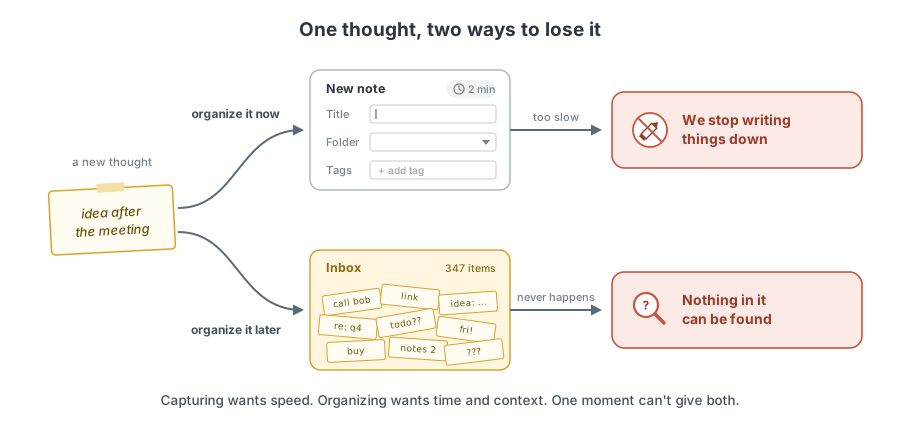
If we organize it now, every note turns into a small form: a title, a folder, a few tags. That’s too slow, so we stop writing things down. If we organize it later, later rarely comes. The inbox turns into a junk drawer: everything is kept, and nothing can be found.
This isn’t about discipline. The two jobs just don’t fit into the same moment.
Save now, organize later
So we split them, and hand the slow job to something that doesn’t mind doing it: an AI agent. Anyone can write anything to an inbox, a person or another AI. Later, on a schedule, the agent organizes it all, following rules we write once.
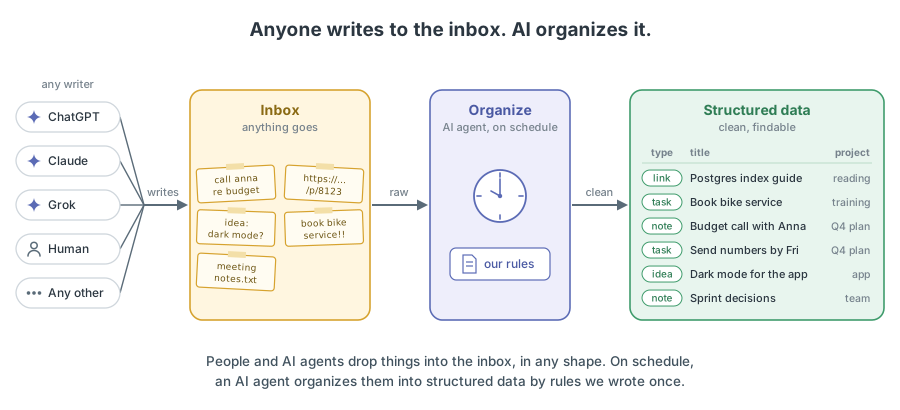
The pattern has three parts, one for each box in the diagram.
Inbox
The inbox takes anything: a line of text, a link, a voice memo, a forwarded email. No title, no tags, no folder. It has one job: don’t lose the thought.
Because it’s so simple, anything can write to it: ChatGPT, Claude, Grok, a phone shortcut, an email forward, or a person typing a line.
Organize
An AI agent runs on a schedule, for example once a night. It reads the new items in the inbox, our rules, and everything organized so far. For each item, it:
- gives it a clear title and fixes typos, without adding or removing facts
- decides what kind of item it is and where it belongs
- links it to related items
- checks the result against the rules, and only then marks the item as done
The rules are plain text, like instructions for a new assistant: every note belongs to exactly one project, reuse existing tags, never delete anything. If an item doesn’t fit the rules, the agent leaves it in the inbox and reports it instead of guessing.
Structured data
Organized items become structured data, which just means everything has a clear shape and a place: notes with titles and tags, tasks with due dates, and a short summary of where each project stands. The agent rewrites the summaries on every run, so they always describe now, not a history of changes.
The original inbox item is never edited, only marked as done. If the agent gets something wrong, the original is still there.
Example: Memo
Memo is my setup for personal notes in Notion, built on this pattern. The inbox is in Notion. The organizing is done by memo-organize, a skill (a small instruction file an agent follows) that runs on a schedule.
Saving to the inbox needs no special tool. Any AI chat connected to Notion can do it with a quick prompt:
Add this to the Memo inbox in Notion.
There’s also a /memo skill that does the same in fewer words. It’s optional and tiny. Here is the whole part that saves a note:
## `/memo <what to keep>`

One page in **Inbox**:

- **Title**: short, English.
- **Body**: with an argument, what it names; without one, the substance of the chat.

Answer with the link, one line. A routine fills in the rest.
No project, no tags, no people, no format. Just a title, a body, and a link back. The quick prompt, the skill, and a person typing into Notion all do the same job, and the organizing step can’t tell them apart.
The real work is in memo-organize. It picks a project for each note, links related notes, and rewrites the summaries. The exact rules are personal: they depend on the use case and the person, and they change over time. That’s fine, because they all live in one place, and saving stays as simple as above.
Where it fits
The same idea works anywhere things arrive faster than we can organize them:
| Inbox gets | Organized into |
|---|---|
| Rough notes | Titled notes linked to a project, with tasks pulled out |
| Emails | Tasks and reply drafts, with the rest archived |
| Links to read later | Short summaries with a topic and reading time |
| Voice memos | Notes and tasks as text |
| Meeting transcripts | Decisions and next steps |
| Project and documentation changes | A list of changes and a current project summary |
| Bug reports and feedback | Labeled issues with duplicates merged |
| Agent chat logs | What the agent should remember about the user |
Notes from the learning loop fit too: rough thoughts from practice go in, and organized notes come out when it’s time to share them.
Why this works
- Saving is effortless. There’s nothing to decide in the moment, so fewer thoughts get lost.
- Organizing sees the whole picture. The agent reads the inbox and the existing data together, so it can merge duplicates and link related items. A note organized on the spot sees only itself.
- One set of rules, many writers. Whatever writes to the inbox stays simple. Only the agent knows the rules, and it applies them the same way every time.
- Mistakes can be undone. The original items stay. When the rules change, old items can be organized again.
- It’s cheap. Saving to the inbox needs little or no AI. The agent reads the rules and the existing data once per run, not once per item. And since nobody is waiting, it can use a slower, smarter model.
What it costs
The pattern isn’t free, but each cost has a simple fix.
- Delay. Items wait until the next run. Urgent things don’t belong in an inbox. They need action now.
- Wrong guesses. Sooner or later, the agent will put something in the wrong place. Three habits keep these mistakes small: keep the original item, check the result against the rules, and leave unclear items in the inbox.
- One more thing to run. A scheduled job needs a place to run, and it can fail without anyone noticing. A short report after every run makes problems easy to spot.
- Trust. Handing our notes to an agent feels risky at first. Checking the first few runs builds trust faster than any rule.
Wrap-up
Saving and organizing are two different jobs, and trouble starts when we try to do both at once. Splitting them gives each job what it needs: saving gets speed, organizing gets time and context.
Keep the inbox simple, make the organizing smart, and let a schedule connect the two. The rest is choosing where the inbox lives.
Resources
- Getting Things Done, the productivity method built around an inbox
- Memory consolidation, how the brain stores the day’s memories while we sleep
- LangMem: hot path vs subconscious memory, the same split for AI agent memory
- Autonomous agents that sleep, on agents that run in short turns instead of long loops